Want to write in your local language? Here is a tool - Google Transliteration IME

0

Category: , , ,

Writing skills are rare. It is always fun to write in mother tongue. Today I am writing about a new tool which allows you to write in your language (  Gujarati, Hindi, Kannada, Malayalam, Marathi, Nepali, Punjabi, Tamil, Telugu, Urdu, Arabic, Bengali, Farsi (Persian) and Greek).

Thanks to google which has lanched a tool called Google Transliteration IME. An IME is an "Input Method Editor" and simply refers to software that lets you type in a language of your choice.Once you download the Google Transliteration IME(it's free and there's no signup required), you can type a word the way it sounds using Latin characters and it will convert the word to its native script. For example, typing "hamesha" transliterates into Hindi as : हमेशा.

Google Transliteration IME offers several features focused on an improved user experience, including offline support, word completion, personalized choices, easy-to-use keyboard, quick search and several cool customization options. As a user types, a suggestion menu is displayed with alternatives and word completions. For example, as you type "googl" you will see five options from you can select the correct one.

Google Transliteration IME allow users to create content or communicate in their preferred language online or offline and in any application of their choice. The Google Transliteration IME currently supports 32-bit Windows 7/Vista/XP.

Google Transliteration is also available in Blogger, Gmail, Knol, Orkut and as a bookmarklet. You can also enable it on your website using the transliteration API.


Google Transliteration IME is an input method editor which allows users to enter text in one of the supported languages using a roman keyboard. Users can type a word the way it sounds using Latin characters and Google Transliteration IME will convert the word to its native script. Note that this is not the same as translation -- it is the sound of the words that is converted from one alphabet to the other, not their meaning. Converted content will always be in Unicode. For example, typing "hamesha" transliterates into Hindi as: Hindi transliteration example and typing "salaam" transliterates into Persian as: Farsi transliteration example

Google Transliteration IME is available for 14 different languages - Arabic, Bengali, Farsi (Persian), Greek, Gujarati, Hindi, Kannada, Malayalam, Marathi, Nepali, Punjabi, Tamil, Telugu and Urdu.

Sample status window and the edit window for Hindi IME are shown below. For simplicity, Hindi IME is used as an example at most places in this help page.
Hindi IME

Install

To install, download and run the installer and follow the instructions on screen.

  • More than one language IME can be installed on the same client machine.
  • Requirements are Windows 7/Vista/XP 32-bit operating systems.
  • Only one instance of IME will be installed per machine but the configuration is done for each user using IME.

    Install Window

    Install Window

    Install Window


Uninstall

To uninstall, follow these steps:

  1. Click on the "Start" menu.
  2. Select "Control Panel" and then go to "Add or Remove Programs".
  3. In the program list, select the "Google <Language> Input", click on "Change/Remove" button.
  4. By default, "Retain my personal data with settings" option will be checked, which will not clean your personal customizations like display font, user correction cache etc., as part of uninstall. Uncheck the option, if you want to clean all your personal settings information.
  5. In the "Uninstall Google <Language> Input" dialog box, click "Yes".

    Uninstall Window


If you want to use IME with any application like notepad, you must first open the application and then open our IME. IME can be opened by clicking on the language bar on the desktop and then selecting the IME language icon or through a shortcut key if it's already configured. To close IME, you can change the language in language bar or try right clicking on the current application to see whether it supports 'Close IME' popup menu option or by closing the current application.

Displaying Language Bar

  • In desktop, right click on tool bar and select Toolbars -> Language bar

    Language Bar


Enabling Language Bar

If the 'Language bar' option is not visible in 'Toolbars', then it needs to be enabled through control panel:

Windows 7/Vista

  1. Control Panel -> Regional and Language Options -> Keyboard and Languages tab
  2. Click on Change keyboards... button to open Text services and input languages dialog
  3. Navigate to Language Bar tab
  4. Enable the radio button Docked in the taskbar under Language Bar section
  5. Apply all settings and try to display language bar as mentioned in previous section.

Windows XP

  1. Go to Control Panel -> Regional and Language Options -> Languages tab -> Text services and input languages (Details) -> Advanced Tab
  2. Make sure that under System configuration, option Turn off advanced text services is NOT checked.
  3. Go to Control Panel -> Regional and Language Options -> Languages tab -> Text services and input languages (Details) -> Settings Tab
  4. Click Language Bar
  5. Select Show the Language bar on the desktop. Click OK.
  6. If you are installing the IME for East Asian language or Right-To-Left language, go to Control Panel -> Regional and Language Options -> Languages Tab
  7. Make sure that options Install files for complex scripts and right to left languages and Install files for East Asian languages are checked in the checkboxes. This requires installation of system files and the system will prompt to insert the Operating System Disc.
  8. Apply all settings and try to display language bar as mentioned in previous section.


IME Shortcut

A shortcut key sequence can be applied to the IME as follows which can be used to quickly enable IME for any in-focus application:

Windows 7/Vista

  1. Control Panel -> Regional and Language Options -> Keyboard and Languages tab
  2. Click on Change keyboards... button to open Text services and input languages dialog
  3. Navigate to Advanced Key Settings tab
  4. If Google <Language> Input is not listed in Installed Services box, then click Add and in Add Input language dialog box, go to the language for which you want to enable IME in the languages tree and expand the node. Check the checkbox next to Google <Language> Input in the list.
  5. In Hot keys for input languages Select To <Language> - Google <Language> Input
  6. Press Change Key Sequence
  7. Select Enable Key Sequence
  8. Select option like Left ALT + SHIFT + Key 1
  9. Apply all changes
  10. Now opening an application like notepad and pressing Left ALT + SHIFT + Key 1 should open the IME.

Windows XP

  1. Control Panel -> Regional and Language Options -> Languages tab -> Text services and input languages (Details) -> Settings Tab
  2. If either <Language> or Google <Language> Input not listed in Installed Services box, then click Add and in Add Input language dialog box, select <Language> in Input language and Google <Language> Input in Keyboard layout/IME. Click OK
  3. Press Key Settings
  4. In Hot keys for input languages, Select Switch to <Language>-Google <Language> Input
  5. Press Change Key Sequence
  6. Select Enable Key Sequence
  7. Select option like Left ALT + SHIFT + Key 1
  8. Apply all changes
  9. Now opening an application like notepad and pressing Left ALT + SHIFT + Key 1 should open the IME.

Status Window

Whenever you enable our IME for an application either through a shortcut or through language bar, its status window will be visible on the screen. By default it will be placed at the bottom right corner of your desktop which can also be moved around. It is used for more configuration and controlling various features of our IME. It has four icons with leftmost being the application icon. Next to it are IME language indicator button, keyboard button and menu button in that order.

Status Window

Edit Window

When the IME is enabled for an application like notepad and you start typing, IME displays the edit window with the typed text and the corresponding word choices in IME language. In the below example, user has typed 'googl' and the IME has displayed five choices numbered 1 to 5.

Edit Window

Navigation and Selection

By default the leftmost choice will be highlighted indicating active choice. Active choice can be changed by navigating other choices through BOTTOM-ARROW or TAB key - which moves the selection to the right; or through UP-ARROW or SHIFT+TAB keys - which moves the selection to left. To select one of the choices as the new word for your application, use ENTER key which inserts the active choice to the application at its current cursor position. Using SPACE or any other PUNCTUATION CHARACTER also inserts the active choice to the application along with the typed punctuation character. Exception will be when IME thinks that there is a better choice of word containing the punctuation character as part of the word itself. All the above controls only insert the active choice (highlighted) into the application. Another way to insert any choice even if it is not active is using its position number as: CTRL+<choice_number>.

Navigation

Word Completions

When you type a word, the choices displayed in edit window will be either in BLACK or BLUE color. Intuitive partial word choices for the typed content are displayed in BLACK color which will always be grouped on the left side. If there are any better dictionary-based word completions for the typed content, they are displayed in BLUE color and grouped on the right side.

Paging

In the example being discussed, IME displays only 5 choices in the edit window which is the page size setting of the edit window. It can be configured through the menu button of the status window. If there are more choices than the page size set, then it will be displayed in the next page. Page navigation can be done through the small arrow buttons at the right bottom corner of the edit window or through PageUP and PageDown keys. Even when you navigate the choices with arrow or tab keys, the control moves to the next or previous page from either end of the edit window.

Paging

Search

At anytime while typing in edit window, if you click the Google image on top right corner of the edit window, it triggers a web search for the active/highlighted choice in google.com. Search can also be triggered for non-active choice by right-clicking on any choice and then clicking the Search... drop-down button.

Search

User Cache

There will be scenarios where the leftmost choice is not the one you are looking for and you select some other choice (second choice in the below example for typed word 'program') which will be inserted into the application.
User Cache
IME remembers this selection for the current user and when the user next types 'program' again, the last selected choice will now be displayed as the leftmost choice. To share this information across all applications for a user, this is persisted at user level even after closing the application. But this persisting behavior can be disabled through the 'Disable User Cache' option from menu button of status window. Note that caching doesn't apply if you select word completions. It is only for word choices shown in BLACK color.

User Cache

Switch to English

If you want to add both roman alphabet (typically English) content and IME language content to any application, there is an easy way to switch between the two. In one mode IME gives you choices in its language and in another mode it just emits what you have typed. Toggling can be done by clicking the IME language button in status window or through shortcuts: CTRL+G or F12.

Toggle Language

Keyboard

When you don't get some words as expected choices for any rare complex words; you can use the flexible keyboard to input any possible word. You can open the keyboard by clicking the keyboard button on status window or through the shortcut CTRL+K. Mouse is used to enter characters from the IME keyboard which also triggers word completions in the edit window. Keyboard can be closed by clicking the keyboard button again on status window or through shortcut keys: CTRL+K or ESC. There is also option to enter Zero Width Joiner (ZWJ) and Zero Width Non Joiner (ZWNJ) characters.

Keyboard

Customization

You can customize many features through IME's menu. Options available through the menu popup in status window are:

  • Select the font and size to be used to display the choices in IME language inside edit window (Suggestion Font).
  • Select the font and size to be used to display the English/Roman characters inside edit window.
  • Set the page size for edit window to restrict its size through number of choices.
  • Enable or disable the persistence of user cache.
  • Information about the IME like version.
  • Help, linking to this page.

Customization

Special Cases

There are some special cases in how IME behaves for some characters in some languages:

  • Example in Arabic for special case of SPACE where it is part of the typed word.
    SPACE Special
  • Example in Arabic for special case of PUNCTUATION where it is part of the typed word.
    PUNCTUATION Special
  • Example in Greek for special case of CAPITALIZATION where only first character being in uppercase in input retains its casing.
    Camelcase Special
  • Example in Greek for special case of CAPITALIZATION where all uppercase word in input retains its casing.
    Camelcase Special
  • Example in Greek for special case of DIGITS where number is converted digit wise instead of its whole value.
    Digit Special

Download Google Translitration IME


Posted via web from systemdioxide's posterous

Still using IE6? Say it Good Bye

0

Category: , , ,

If you are still using IE6 (Internet Explorer version 6) time has come to say it Good Bye.

How to check whether you are using IE6 - Open Internet Explorer, Go to Help and scroll down to About Internet Explorer - Click it you should see the version you are using.

Apart from the security issues, there are number of reasons why you should say it good bye. Read them here: http://mashable.com/2009/07/16/ie6-must-die/ and here: http://mashable.com/2010/01/18/5-more-reasons-why-ie6-must-die/

Yesterday only google announced that it is going to stop supporting IE6 for Google Apps (Google Docs/Google Sites). Normal 0 false false false EN-US X-NONE X-NONE <!-- /* Font Definitions */ @font-face {font-family:"Cambria Math"; panose-1:2 4 5 3 5 4 6 3 2 4; mso-font-charset:0; mso-generic-font-family:roman; mso-font-pitch:variable; mso-font-signature:-1610611985 1107304683 0 0 159 0;} @font-face {font-family:Calibri; panose-1:2 15 5 2 2 2 4 3 2 4; mso-font-charset:0; mso-generic-font-family:swiss; mso-font-pitch:variable; mso-font-signature:-1610611985 1073750139 0 0 159 0;} @font-face {font-family:Consolas; panose-1:2 11 6 9 2 2 4 3 2 4; mso-font-charset:0; mso-generic-font-family:modern; mso-font-pitch:fixed; mso-font-signature:-1610611985 1073750091 0 0 159 0;} /* Style Definitions */ p.MsoNormal, li.MsoNormal, div.MsoNormal {mso-style-unhide:no; mso-style-qformat:yes; mso-style-parent:""; margin:0in; margin-bottom:.0001pt; mso-pagination:widow-orphan; font-size:11.0pt; font-family:"Calibri","sans-serif"; mso-ascii-font-family:Calibri; mso-ascii-theme-font:minor-latin; mso-fareast-font-family:Calibri; mso-fareast-theme-font:minor-latin; mso-hansi-font-family:Calibri; mso-hansi-theme-font:minor-latin; mso-bidi-font-family:"Times New Roman"; mso-bidi-theme-font:minor-bidi;} p.MsoPlainText, li.MsoPlainText, div.MsoPlainText {mso-style-noshow:yes; mso-style-priority:99; mso-style-link:"Plain Text Char"; margin:0in; margin-bottom:.0001pt; mso-pagination:widow-orphan; font-size:10.5pt; font-family:Consolas; mso-fareast-font-family:Calibri; mso-fareast-theme-font:minor-latin; mso-bidi-font-family:"Times New Roman"; mso-bidi-theme-font:minor-bidi;} span.PlainTextChar {mso-style-name:"Plain Text Char"; mso-style-noshow:yes; mso-style-priority:99; mso-style-unhide:no; mso-style-locked:yes; mso-style-link:"Plain Text"; mso-ansi-font-size:10.5pt; mso-bidi-font-size:10.5pt; font-family:Consolas; mso-ascii-font-family:Consolas; mso-hansi-font-family:Consolas;} .MsoChpDefault {mso-style-type:export-only; mso-default-props:yes; mso-ascii-font-family:Calibri; mso-ascii-theme-font:minor-latin; mso-fareast-font-family:Calibri; mso-fareast-theme-font:minor-latin; mso-hansi-font-family:Calibri; mso-hansi-theme-font:minor-latin; mso-bidi-font-family:"Times New Roman"; mso-bidi-theme-font:minor-bidi;} @page Section1 {size:8.5in 11.0in; margin:1.0in 1.0in 1.0in 1.0in; mso-header-margin:.5in; mso-footer-margin:.5in; mso-paper-source:0;} div.Section1 {page:Section1;} -->

Google Apps will continue to support Internet Explorer 7.0 and above, Firefox 3.0 and above, Google Chrome 4.0 and above, and Safari 3.0 and above.


Normal 0 false false false EN-US X-NONE X-NONE <!-- /* Font Definitions */ @font-face {font-family:"Cambria Math"; panose-1:2 4 5 3 5 4 6 3 2 4; mso-font-charset:0; mso-generic-font-family:roman; mso-font-pitch:variable; mso-font-signature:-1610611985 1107304683 0 0 159 0;} @font-face {font-family:Calibri; panose-1:2 15 5 2 2 2 4 3 2 4; mso-font-charset:0; mso-generic-font-family:swiss; mso-font-pitch:variable; mso-font-signature:-1610611985 1073750139 0 0 159 0;} /* Style Definitions */ p.MsoNormal, li.MsoNormal, div.MsoNormal {mso-style-unhide:no; mso-style-qformat:yes; mso-style-parent:""; margin:0in; margin-bottom:.0001pt; mso-pagination:widow-orphan; font-size:11.0pt; font-family:"Calibri","sans-serif"; mso-ascii-font-family:Calibri; mso-ascii-theme-font:minor-latin; mso-fareast-font-family:Calibri; mso-fareast-theme-font:minor-latin; mso-hansi-font-family:Calibri; mso-hansi-theme-font:minor-latin; mso-bidi-font-family:"Times New Roman"; mso-bidi-theme-font:minor-bidi;} .MsoChpDefault {mso-style-type:export-only; mso-default-props:yes; mso-ascii-font-family:Calibri; mso-ascii-theme-font:minor-latin; mso-fareast-font-family:Calibri; mso-fareast-theme-font:minor-latin; mso-hansi-font-family:Calibri; mso-hansi-theme-font:minor-latin; mso-bidi-font-family:"Times New Roman"; mso-bidi-theme-font:minor-bidi;} @page Section1 {size:8.5in 11.0in; margin:1.0in 1.0in 1.0in 1.0in; mso-header-margin:.5in; mso-footer-margin:.5in; mso-paper-source:0;} div.Section1 {page:Section1;} --> Starting next week, users on these older browsers will see a message in Google Docs and the Google Sites editor explaining this change and asking them to upgrade their browser. 

Posted via web from systemdioxide's posterous

Asia-Pacific CACS

0

Category: , , ,

Asia-Pacific CACS Conference logo

Asia–Pacific CACS
22–23 February 2010
Mumbai, India

Register online button

The World’s Leading Conference for IT Audit, Security
and Governance Professionals

If knowledge is power, how powerful are you?
Join Our Linkedin group

Get the knowledge you need to stay one step ahead of the competition and keep up with changing professional trends at ISACA’s Asia-Pacific Computer Audit, Control and Security (CACSSM) Conference. Asia-Pacific CACS is the hot-topic event for IT audit/assurance, security, control and governance professionals in the region, covering issues such as: governance concerns for ERP, how to make IT audit more relevant, wireless network security, cloud computing, and security concerns for service oriented architecture.

At Asia-Pacific CACS the world comes to India. You’ll get world-class, practical education presented by speakers from around the globe. These industry experts are from leading name companies including CA Inc., Chevron, eBay, The World Bank Group, Deloitte, and Citigroup Inc., just to name a few! Every speaker could be the keynote speaker – in fact, some have delivered the keynote address at previous ISACA events.

Your time is valuable; Asia-Pacific CACS makes the most of your time away from the office, and your training dollars. To get the same quality of information you would have to attend several different events spending more time and money.

This unique educational event offers more than just a series of lectures. Immerse yourself in an environment that stimulates learning, provides practical knowledge, encourages collaboration and includes additional resources and tools. Network with an unmatched group of peers. Return to the office, motivated to improve your organisation, immediately apply the information you learned and stay in touch with your new professional contacts. Attend Asia-Pacific CACS, a trusted educational forum where like-minded professionals collaborate and connect.

General Information

Program Information

Keynote Address


Workshops

Venue and Accommodations

Networking


Registration

Sponsors and Exhibitors

General Information

What’s in it for you?

  • Customised learning experience. Make the most of your time away from the office. Choose to attend the sessions that matter most to you and your enterprise and get information that can be put to use immediately when you return.
  • World-class networking opportunities. Interact face-to-face with like-minded individuals and enjoy an ideal environment for unparalleled knowledge sharing.
  • Update your knowledge. Be the first to find out what’s going on at ISACA. Get a sneak peek of new research and projects being developed, and broaden your understanding of what’s going on around the world.
  • Sharpen your skills. Expand your expertise. Earn valuable CPE hours.

What’s in it for your organisation?

  • Exceptional value for training dollars. Attendees receive full documentation from every session that can be shared with colleagues when they return to the office.
  • Exclusive access to industry experts. Tried and tested solutions to problems facing your enterprise from those who have been in your role before. Discover what works and doesn’t work from experienced and successful professionals.
  • Interact with leading vendors. All your organisation’s vendors in one place at the InfoExchange. Get answers to questions directly from vendors. Discover new products that will decrease the expense to your organisation and increase the return.

Pre-conference Workshop Registration

Sunday, 21 February 2010; 7.30 – 17.00

Conference Registration

Monday, 22 February 2010; 7.00 – 17.00
Tuesday, 23 February 2010; 7.30 – 17.00

Pre-conference Workshop

Sunday, 21 February 2010; 9.00 – 17.00

Conference

Monday, 22 February 2010; 9.00 – 17.00
Tuesday, 23 February 2010; 9.00 – 17.00

Continuing Professional Education (CPE) Credits

To maintain Certified Information Systems Auditor™ (CISA®), Certified Information Security Manager® (CISM®) and Certified in the Governance of Enterprise IT® (CGEIT®) certifications, certification holders are required to earn 120 CPE credit hours over a three-year period in accordance with ISACA’s continuing professional education (CPE) policy. Attendees can earn up to 21 CPE credits; 14 by attending the Asia-Pacific CACS and an additional 7 CPE credits for attending each day of optional pre-conference workshops.

Disclaimer

ISACA reserves the right to alter or delete items from the programme in the event of unforeseen circumstances. Material has been prepared for the professional development of ISACA members and others in the IS audit, control, security and governance community. Neither the presenters nor ISACA can warrant that the use of material presented will be adequate to discharge the legal or professional liability of the members in the conduct of their practises. All materials used in the preparation and delivery of presentations on behalf of ISACA are original materials created by the speakers, or otherwise are materials which the speakers have all rights and authority to use and/or reproduce in connection with such presentation and to grant the rights to ISACA as set forth in speaker agreement. Subject to the rights granted in the speaker agreement, all applicable copyrights, trade secrets, and other intellectual property rights in the materials are and remain with the speakers.

Please note: unauthorised recording, in any form, of presentations and workshops is prohibited.

Permission to be Photographed

By attending this event, the registrant grants permission to be photographed during the event. The resultant photographs may be used by ISACA for future promotion of ISACA’s educational events on ISACA’s web site and/or in printed promotional materials, and by attending this event, the registrant consents to any such use. The registrant understands any use of the photographs will be without remuneration. The registrant also waives any right to inspect or approve the aforementioned use of any photographs now or in the future.

Go Green

In an effort to conserve paper, ISACA conferences are going green! Upon registration, ISACA conference attendees will receive a flash drive or CD containing the most current conference presentation materials available. This will allow attendees to view presentations on their laptops and make notes during the conference. Attendees will receive online access to all available conference presentations two weeks prior to the conference, enabling them to view the presentations they are interested in or print hard copies to bring to the conference. Please note: printing stations will not be provided onsite at the conference. If you have any questions, please contact the conference department at conference@isaca.org or +1.847+660.5585.

Not a member of ISACA? Join today!

When you register for the conference as a non-member, the difference between member and non-member conference fees can be applied towards ISACA membership. This means you can become a member at the international and chapter level for little to no additional cost; it just depends on your local chapter dues. To take advantage of this great offer, tick the box on the registration form. For more information about ISACA membership, visit the web site at www.isaca.org/membership or contact the membership department at membership@isaca.org.

NOTE: This offer expires 30 days after completion of the event. Non-members pay the non-member conference fee when registering.

Dress

Business casual is appropriate for the Asia-Pacific CACS Conference and all conference events.

2010 Asia-Pacific CACS Conference Task Force

Avinash Kadam, CISA, CISM, CGEIT (Chair)
Director
MIEL e-Security Pvt. Ltd.
India

Fareeduddin Ahmad, CISA, CISM
Information Security Monitoring Manager
The National Commercial Bank
Saudi Arabia

Srinivasan S Krishnaswamy, CISA, CISM, CGEIT
President
SKS Consulting
India

Larry C.K. Lam, CISA
Managing Director
McGuire Asia Pte Ltd
Singapore

Saji P. Oommen, CISA, CISM, CGEIT
General Manager (Group IT)
Al Batha Group
UAE

R. Vittal Raj, CISA, CISM, CGEIT
Partner
Kumar & Raj, Chartered Accountants
India

Markus Walter, CISA, CISM
Manager, IT Advisory
KPMG Austria GmbH
Austria

Nalin Wijetilleke, CISA, CGEIT
Manager – Business Continuity Planning
RAKBANK
United Arab Emirates

Top

Streams

Who Should Attend/Prerequisites

Sessions include a variety of educational topics aimed at the practitioner, senior practitioner, manager and leader (executive). Those who will benefit most from attending this conference should have a minimum of three years experience in IT governance, management, audit/assurance and/or security.

The intended audience includes:
  • IT audit professionals
  • IT audit managers
  • Information security professionals
  • Information security managers
  • IT governance professionals
  • Assurance professionals
  • IT professionals
  • Risk managers
  • Senior and executive managers
  • CIOs, CISOs and other members of the C-suite

Educational Focus

P Practitioner (3 to 5 years of experience)
S Senior practitioner (at least 5 years of experience)
M Manager
L Leader (executive)

Top

Keynote Address

Shyamal Ghosh2010 Asia-Pacific CACS Keynote Speaker

Shyamal Ghosh
Chairman
Data Security Council of India: a NASSCOM initiative

Mr. Shyamal Ghosh is the chairman of the Data Security Council of India. Retired from the Indian Administrative Service, his major assignments include chairman of Telecom Commission & Secretary, Department of Telecommunications; Secretary, Ministry of Textiles; Secretary, Department of Electronics; Director General of Foreign Trade, Ministry of Commerce; and Joint Secretary, Department of Chemicals and Petrochemicals.

Mr. Ghosh holds a Bachelor of Arts (Hons.) degree in Economics from Scottish Church College, Calcutta, and a Master’s degree in Economics from Calcutta University. He was awarded the Parvin Fellowship for the Masters of Public Administration program at the Woodrow Wilson School of Public and International Affairs at Princeton University.

As Joint Secretary (Chemicals) Mr. Ghosh was assigned the task of handling the Bhopal Gas Case in all its aspects, including relief and rehabilitation, initiating a comprehensive review of the regulations relating to safety in Chemical industries and coordinating the legal case against Union Carbide both in USA and in India and providing support to the Attorney General of India, who was in charge of the case.

Mr. Ghosh has represented India at various international conferences, served as a UNIDO consultant, presented a paper on Legal Rights of Chemists and Safety Standards at the International Symposium on Chemistry and Safety, and was responsible for bringing out the first Harmonized Code of the Import-Export Policy. As Secretary, Department of Electronics to the Government of India he was in charge of formulating policy for promoting Electronics Hardware & Software industry including Information Technology related matters. He was also responsible for initiating the formulation of the Information Technology Act.

Mr. Ghosh has written several articles for newspapers and journals on various issues relating to Telecom and Information Technology. During his tenure as Chairman, Telecom Commission major reforms in the Telecom Sector were initiated and implemented leading to the complete opening up of the Telecom Sector in India for private sector participation. He has served as Consultant to the World Bank for “Universal Service Obligation” matters.

Top

Pre-conference Workshops

In addition to the two streams, attendees have the option of participating in pre-conference workshops. These full-day workshops will use case studies, group exercises and demonstrations to convey techniques and methodologies, and introduce tools to accomplish the objectives.

  • WS1—Using COBIT 4.1 for IT Governance and Assurance: A Step-by-step Methodology
  • WS2—Auditing Business Continuity and Disaster Recovery Plans and Programmes

Show/Hide Workshops

Top

Venue and Accommodations

The Asia-Pacific CACS Conference will be held in Mumbai, India at the conveniently located at the Hyatt Recency Mumbai.

Hyatt Regency Mumbai
Sahar Airport Road
Mumbai, Maharashta 400099 India
Telephone: 91.22.6696.1234
Fax: 91.22.6696.1235
Web: www.hyatt.com

Room Rate: INR 8,000 (Single)
INR 8,750 (Double)
(Inclusive of breakfast)

Guest room cut-off date: 1 February 2010
PDF file Reservation Form

Why not stay in the heart of the conference action at a discounted hotel price? To guarantee you receive the discounted price, it is highly recommended that you make your reservations as soon as possible as our hotel block may sell out before the cut-off date. Please be certain to mention that you are reserving a room as part of the ISACA Conference.

Top

Networking and Social Events

InfoExchange Exhibit Hours

Monday, 22 February 2010; 17.00 – 19.30
Tuesday, 23 February 2010; 10.30 – 11.00, 12.30 – 13.30, 15.00 – 15.30
Interact with leading vendors and programme sponsors and continue to network with peers at ISACA’s InfoExchange. While you explore the newest products available to IT professionals, exhibitors will be available to demonstrate products and answer your questions.

Top

Registration

Conference Pricing

All fees are quoted in US dollars. The entire registration fee must be received by ISACA before your registration will be considered paid in full.

Conference Registration Fees

ISACA Member early bird discount (Before 6 February 2010) US $200
ISACA Member (After 6 February 2010) US $225
Non-member early bird discount (Before 6 February 2010) US $300
Non-member (After 6 February 2010) (not a member?) US $325

One day Workshop Registration Fees

ISACA Member US $125
Non-member US $175
Cancellation Deadline 3 February 2010

Register for the conference and one of the workshops, at the same time, and receive a discount on registration fees.

Member early-bird: US $300
Member: US $325
Non-member early-bird: US $450
Non-member: US $475

Programme Benefits

Your Asia-Pacific CACS registration fee includes:
  • Attendance at the conference sessions of your choice
  • A complete set of electronic proceedings that includes all session presentations received by the production deadline
  • An opportunity to earn up to 21 CPE credit hours
  • Complimentary lunch for workshop attendees on Sunday, 21 February 2010
  • Complimentary lunches for conference attendees on Monday, 22 February 2010 and Tuesday, 23 February 2010
  • Morning and afternoon refreshment breaks on Monday, 22 February 2010 and Tuesday, 23 February 2010
  • Unlimited entry to the InfoExchange exhibits on Monday, 22 February 2010 and Tuesday, 23 February 2010

VISA

Obtaining a VISA is solely the responsibility of the registrant. Please contact the local government of the host country for details. Once a paid registration is received, a letter of invitation will be provided by ISACA, upon request.

Registration Methods

Choose one of four easy ways to register:
  1. Online at www.isaca.org/asiacacs
  2. Fax your completed registration form to +1.847.253.1443
  3. Mail your completed registration form to:
    ISACA
    1055 Paysphere Circle
    Chicago, IL 60674 USA
  4. Bank Wires—send electronic payments in US dollars to:
    Bank of America
    135 S LaSalle St.
    Chicago, Illinois 60603
    ABA #0260-0959-3
    ISACA Account #22-7157-8
    S.W.I.F.T. code BOFAUS3N
    [Please include attendee’s name and AsiaCACS on the Advice of Transfer.]

Cancellation Policy

If your plans change and you won’t be able to attend the conference and/or workshop, contact us by phone, fax or e-mail to cancel your registration. All cancellations must be received by 3 February 2010 to receive a refund of registration fees. A cancellation charge of US $100 will be subtracted from conference refunds, and US $50 from workshop refunds. No refunds can be given after 3 February 2010. Attendee substitution is permitted at any time until the conference. If a non-member is substituting a member, then there will be additional non-member fees.

NOTE: Registration is contingent upon full payment of the registration fee. To guarantee registration, conference and/or workshop fees must be received by the published deadline. It may take 10 or more business days for a wire transfer or mailed check to reach ISACA, so please plan accordingly. If, for any reason, ISACA must cancel a course or event, liability is limited solely to the registration fees paid. ISACA is not responsible for other expenses incurred, including travel and accommodation fees. Conference materials are not guaranteed to those who register onsite or fail to submit payment prior to the event. For more information regarding administrative policies, please contact the ISACA conference department:

Phone: +1.847.660.5585
Fax: +1.847.253.1443
E-mail: conference@isaca.org

Register online button

PDF file Fillable Registration Form

Top

Sponsors and Exhibitors

Sponsors

Gold Sponsors Silver Sponsors Bronze Sponsors

Sponsor: Ernst & Young ShinNihon LLC--> Sponsor: Deloitte -->

Image

Sponsor: CaseWare Idea--> KPMG Logo --> PricewaterhouseCoopers -->

Exhibitors

  • ACL Services Ltd.
  • MIEL e-Security Pvt. Ltd.
  • Qualys

Learn about ISACA Tiered Sponsorship Opportunities.

Top

Questions?

Contact the Education/Conference Department:

Tel: +1.847.660.5585
Fax: +1.847.253.1443
conference@isaca.org


Posted via web from systemdioxide's posterous

How to Protect Your Reputation Online

0

Category:

With Google real-time search and sites like Facebook and Twitter continuing to grow, it's more necessary than ever to monitor your online reputation. Here are steps you can take to ensure you're viewed professionally -- and advice on what to do if you're associated with harmful content.

http://www.cio.com/article/527158/How_to_Protect_Your_Reputation_Online?source=rss_all

Posted via web from systemdioxide's posterous

Experience Base: Vendor Negotiation

0

Category:

Negotiating contracts with IT partners—and managing the resulting relationships—is a proficiency that's multiplying in importance for IT leaders as outside providers deliver more and more of the IT solutions portfolio.

http://www.cio.com/article/527157/Experience_Base_Vendor_Negotiation?source=rss_all

Posted via web from systemdioxide's posterous

Meet the Man with Big Love for Big ERP

0

Category:

If you follow the ERP market closely—and, really, who doesn't these days?—then you've probably heard of Big ERP. http://www.cio.com/article/527164/Meet_the_Man_with_Big_Love_for_Big_ERP?source=rss_all

Posted via web from systemdioxide's posterous

Managing Your Reputation Online: 5 Essential Tools

0

Category:

You must monitor what people are saying about you in order to keep your reputation online intact. These five free tools will help you stay up to date whenever you're mentioned. http://www.cio.com/article/527159/Managing_Your_Reputation_Online_5_Essential_Tools?source=rss_all


Posted via web from systemdioxide's posterous

Download Smarter Ways for Vendors to Reach CIOs

0

Category: ,

A best-practices field guide and public teleconference exploring the problems of, and solutions for, IT vendors cold-contacting CIOs to win new business http://www.cio.com/article/527168/Download_Smarter_Ways_for_Vendors_to_Reach_CIOs?source=rss_all

Posted via web from systemdioxide's posterous

When Standards Bodies Are the Cyber Threat

0

Category:

Believe it or not, some practices of the groups charged with producing security standards represent cyber threats in their own right. As government and industry increasingly collaborate to enhance cyber security, it is critical these practices be considered as part of the overall cyber security framework. Read it here: http://www.cio.com/article/527179/When_Standards_Bodies_Are_the_Cyber_Threat?page=2&taxonomyId=3089

Posted via web from systemdioxide's posterous

SAP sales beat expectations

0

Category:

For the fourth quarter ending in December, SAP took in sales of 3.18 billion euros, a 9 percent decline from 3.48 billion euros in 2009's final quarter. Quarterly income fell from 830 million euros in the prior-year quarter to 727 million euros, a 12 percent drop.

http://news.cnet.com/8301-1001_3-10442039-92.html?part=rss&amp;subj=news&amp;tag=2547-1_3-0-20

Posted via web from systemdioxide's posterous

Where do you stand? Check your IT Knowledge

0

Category: , , ,

What is the level of your IT Knowledge? ERP, Database, Data Warehouse, OLAP, BI - what these buzzwords are. Check this video, see if you stand out from the crowd:


Posted via web from systemdioxide's posterous

Looking to automate your business processes? Try PostBooks

0

Category: , , , ,

PostBooks is an open source accounting, ERP, and CRM system that shares a code base with the commercially-licensed editions of xTuple ERP. PostBooks uses PostgreSQL as database and it is developed using Qt framework for C++.

Modules:
•    Accounting (general ledger, accounts receivable and payable, bank reconciliation, financial reporting)
•    Sales (quotes, order entry, sales reporting, shipping)
•    CRM (universal address book, incident management, opportunity management, to-do lists, project management)
•    Purchasing (purchase orders, receiving, vendor reporting)
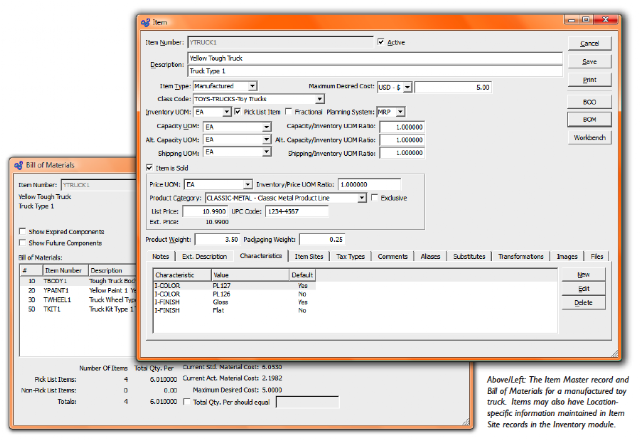
•    Product Definition (items, infinite-level bills of material)
•    Inventory and Distribution (multiple locations, other advanced warehouse features)
•    Light Manufacturing (work orders, strong support for make-to-order)
•    OpenRPT open source report writer

PostBooks runs on almost all the platforms Windows, Linux and Mac. It supports multi-currency, multi-tax structures and multi-languages.

License:
PostBooks is licensed under CPAL, the OSI-certified Common Public Attribution License.

Screenshots:

See PostBooks in action:

http://postbooks.sourceforge.net/videos/BusinessFlow-EndToEnd.swf

Download:

http://www.xtuple.com/pb-gettingstarted

Posted via web from systemdioxide's posterous

Other Voices: Visions for the Project Management Software Industry

0

Category:

Despite the technological innovations in the software industry over the past 40 years, there has been a noticeable lack of progress in the project management software industry -- neither in increasing the size of the market or the penetration of project management functions into enterprises.

Read it in full here: http://www.ddj.com/architect/222400080

Posted via web from systemdioxide's posterous

Five Audit Management Software alternatives to have better control over your auditing assignments

0

Category:

Controlling your audit assignment is vital to meet the statutory deadline, cost control, resource optimization and client satisfaction. Today we are presenting an overview of the five popular audit management software solutions.
What to expect from Audit Management Software?
1. Client and project data management
2. Auditing methodology, audit program, knowledge base, templates and document management
3. Audit Plan and Resource Management
4. Audit Working Papers Management
5. Time and Expense Management
6. Audit Risk Management
7. Reporting and Workflow Management
Benefits of using Audit Management Software:
1. Defines the methodology to be followed while executing the audit. Everyone follows the same methodology and program and hence brings uniformity and quality in the entire process.
2. Increases efficiency of the entire audit function through planning and resource management. Brings clear visibility into personnel assignment and tracking of assignments
3. Enhances quality of the audit by bringing in best practices to assess and test controls
4. Enables creation of knowledge base about a client/industry which can be repeatedly applied every year
5. Automates audit report generation
6. Reduces time spent in documenting and reviewing audit work papers
7. Supports risk based auditing
8. Enables synchronization of audit related data
9. Enables performance review of the auditors
10. Saves time on administrative tasks such as planning, budgeting and monitoring
Making a case for Audit Software:
If you have ever experienced the following, you require audit management software:
1. Don't know your audit priorities, which assignment to take first, whom to deploy on an audit, how to track their progress, how to measure their performance
2. You are becoming MS Excel expert, writing formulas to compare current year and previous year data, consolidating the information and versioning your MS Excel Sheets. Finally when you are done, you don't know where to store it for the next use
3. Each auditor has his own style of working. There is no consistency in auditing approach and methodology. If the auditor changes the job, you have to redo everything
4. There is no easy way to get at a glance understanding of the status of the audit work
5. You can't identify recurring issues and trends for a specific audit
6. You are finding it difficult to synchronize all the information you gathered
7. There are always delays in executing audit work and late night sitting is inevitable
Five Audit Management Software Solutions:
Posted via web from systemdioxide's posterous
visit us online at: http://www.systemdioxide.com

System Dioxide